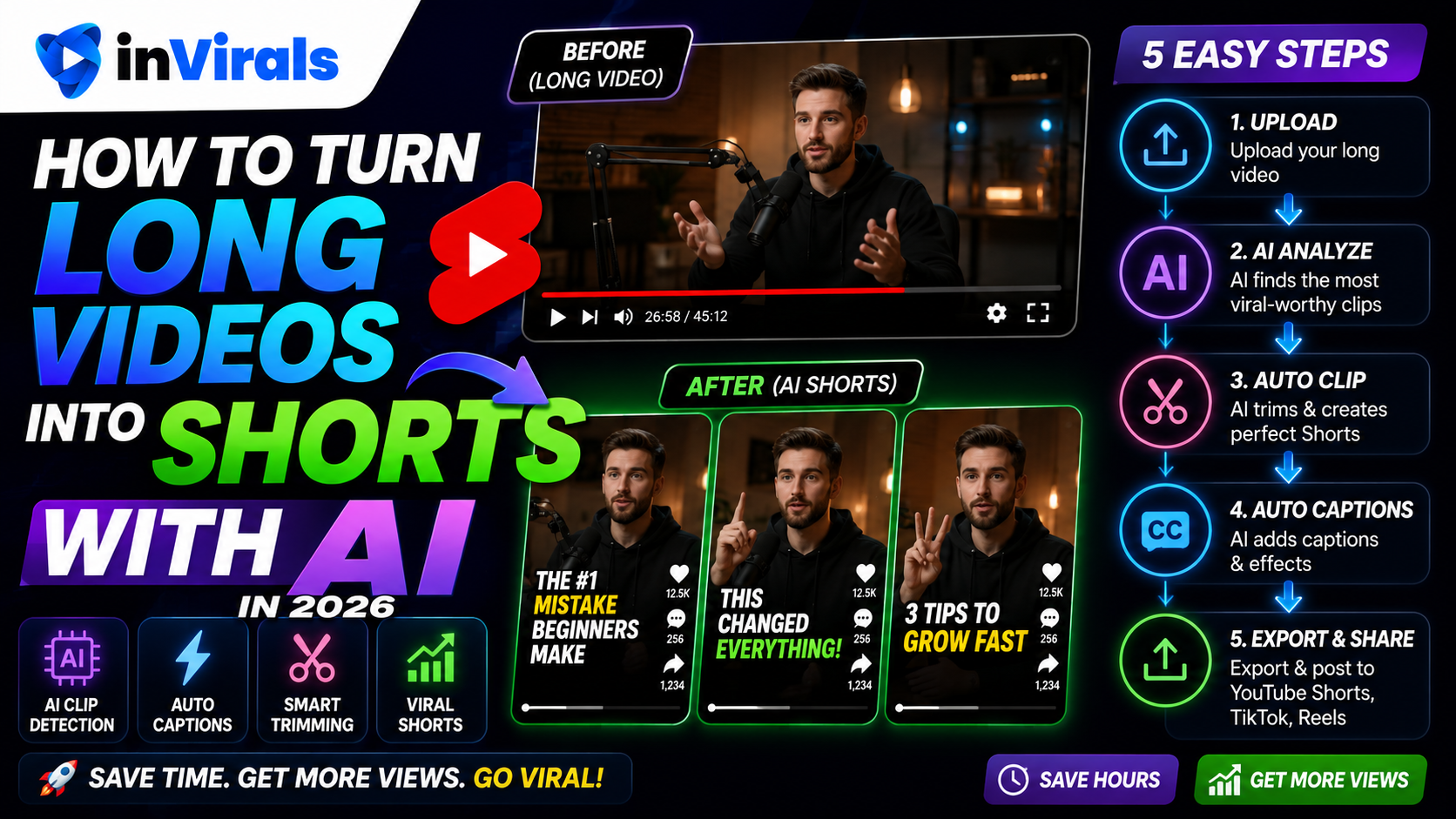
How to Turn Long Videos into Shorts with AI in 2026
If you create long-form content like YouTube videos, podcasts, webinars, or livestreams, you are sitting on a goldmine of short-form clips. One hour of content can become 10 to 20 individual shorts for TikTok, YouTube Shorts, and Instagram Reels. The problem used to be time: manually finding the best moments, cutting them, reframing to vertical, and adding captions took hours. In 2026, AI does all of it in minutes. This guide shows you exactly how to turn long videos into shorts with AI, step by step.
The strategic case for repurposing is simple: creating a long video is the expensive part, and clipping is the cheap part that multiplies its return. A single podcast episode might take hours to record and edit, but the clips you pull from it cost minutes each and reach audiences that would never have found the full episode. Short-form is where discovery happens in 2026, the feeds on TikTok, Reels, and Shorts push content to non-followers by default, so each clip is a fresh chance to reach someone new. Repurposing turns one piece of work into a dozen discovery opportunities, which is why it has become standard practice for serious creators rather than an afterthought.
Why repurposing long videos is so powerful
- Maximum value from existing content. You already did the hard work creating the long video; clips multiply its reach.
- More posting volume. One long video can feed a week of daily shorts.
- Cross-platform growth. The same clips work on TikTok, Shorts, and Reels.
- Discoverability. Shorts drive new viewers back to your long-form content and channel.
There is also a compounding effect that makes repurposing one of the highest-return activities a creator can do. Every long video you have ever published is a dormant asset. A two-year-old podcast episode that has stopped getting views can be sliced into ten fresh shorts today, each of which gets a brand-new chance in the algorithm. You are not just multiplying new content, you are reactivating your entire back catalog. For a creator with fifty old long videos, that is potentially five hundred shorts waiting to be made, without recording anything new. This is why established long-form creators who start clipping often see faster short-form growth than people starting from scratch: they are sitting on years of raw material.
What you need
- A long video (your own content, an interview, a podcast, etc.).
- An AI clipping tool such as the inVirals AI clip generator.
- Social accounts to publish the clips.
Step 1: Upload your long video
Start by uploading the long video to your AI tool, or paste the link if it supports direct import. The AI will process the full video and analyze it for the most engaging moments. With inVirals, this happens automatically once your video is in.
Almost any long-form source works: a YouTube upload, a recorded podcast, a webinar, a conference talk, a livestream VOD, or an interview. The richer the spoken content, the more clips you will get, which is why conversation-heavy formats outperform silent or music-only footage. If you have a back catalog, you do not need to start with your newest video, older content that has already stopped circulating is often the best place to begin, because every clip from it is effectively new to the algorithm.
Step 2: Let AI find the best moments
This is the core of AI clipping. The tool analyzes speech, pacing, and engagement signals to identify segments most likely to perform as standalone shorts, strong statements, surprising facts, emotional peaks, or self-contained stories. Instead of scrubbing through an hour of footage, you get a set of suggested clips in seconds.
Tip: The best clips have a natural hook at the start and a satisfying conclusion. Look for moments that make sense without the surrounding context.
It helps to know what the AI is listening for so you can judge its suggestions. It tends to favor moments where the speaker's energy rises, where a question is posed and then answered, where a strong opinion or surprising number is stated, and where a short story has a clear beginning and end. These are exactly the segments that work as standalone shorts because they contain their own tension and release. When you review the AI's picks, you are mainly confirming two things: that the clip opens on its strongest line and that it resolves rather than trailing off. The AI does the heavy lifting of finding candidates; your job is the final quality judgment that turns a good candidate into a great post.
Which long videos clip best
Not every long video is equally rich in clips, and knowing the difference helps you prioritize. Conversational and story-driven content yields the most clips because high points occur naturally throughout. Here is how common formats compare.
| Source format | Clips per hour (typical) | Why |
|---|---|---|
| Podcast / interview | 10–20 | Frequent quotable moments and natural hooks |
| Tutorial / webinar | 8–15 | Each tip or step becomes a self-contained clip |
| Livestream / Q&A | 8–15 | Audience questions create clean segments |
| Keynote / talk | 6–12 | Strong points punctuated by slower setup |
| Vlog | 4–8 | High points are spread out and need trimming |
Step 3: Reframe to vertical
Long videos are usually horizontal (16:9), but shorts are vertical (9:16). AI automatically reframes the footage, keeping the speaker or key action centered as it crops to vertical. This used to require manual keyframing; now it is instant and accurate.
Good reframing is more important than it sounds. A vertical crop that cuts off the speaker's forehead or drifts away from the action looks amateurish and quietly lowers performance, viewers register the sloppiness even if they cannot name it. The AI tracks the focal point and keeps it centered as people move, which solves the problem automatically for most footage. Still, it is worth a quick visual check on any clip with a lot of movement or multiple people, since those are the cases where reframing occasionally needs a manual nudge.
Step 4: Add captions automatically
Captions dramatically increase watch time because most short-form viewers watch on mute. The AI transcribes the audio and generates synced, styled captions. With inVirals you can customize the caption style to match trending formats and your brand.
Beyond simply being present, captions carry your hook in the silent opening seconds, which is when most viewers decide whether to stay. Favor large, high-contrast text positioned in the middle third of the frame, with one or two words emphasized as they are spoken. This active style keeps the eye moving and is strongly associated with high retention. The one habit worth keeping is a quick proofread, AI transcription is accurate but not flawless, and a single visible typo can undercut an otherwise polished clip in front of thousands of viewers.
Step 5: Polish each clip
Before posting, give each clip a quick review:
- Trim the start so the hook lands in the first second.
- Check captions for accuracy.
- Make sure the clip ends on a strong note, not mid-sentence.
- Add a title or context overlay if helpful.
The built-in editor lets you make these adjustments quickly without exporting to another app. This polish step is short but high-leverage: the AI delivers a strong candidate, and your 30-second review is what turns it into a clip that performs. The most common fix is trimming the first second or two so the clip opens on its most compelling line rather than on a slow lead-in, that single edit often makes the difference between a clip that holds attention and one that gets scrolled past.
Step 6: Post across platforms
Each clip can go to TikTok, YouTube Shorts, and Instagram Reels. Rather than uploading manually to each, connect your accounts to inVirals and schedule the clips, or add them to an automated posting series. One long video becomes a week of cross-platform content.
Posting the same clip to all three platforms is one of the highest-leverage moves in short-form, because the production cost is already paid, you are simply distributing the same asset to three separate audiences. A clip that underperforms on one platform sometimes takes off on another, since each feed has a different audience and algorithm. The one caveat is to upload natively to each platform and avoid visible watermarks from other apps, which platforms tend to suppress. Automating this distribution removes the tedious part, the manual re-uploading, so the only decision left is which clips to schedule and when.
A realistic repurposing workflow
- Record or upload one long video (podcast, tutorial, interview).
- Run it through the AI clip generator to get 10 to 20 clips.
- Review and lightly edit the best 7 to 10.
- Schedule them across TikTok, Shorts, and Reels over the next week.
- Repeat with your next long video.
How to title and post clips for maximum reach
The clip itself is only half the job; how you frame it on each platform decides how far it travels. A few habits consistently lift performance:
- Write a hook caption, not a summary. "Wait for the part about sleep" outperforms "Clip from episode 42." The caption should add curiosity, not describe.
- Add an on-screen title for context. A short text overlay in the first second tells a cold viewer what they are about to see and why it matters.
- Use 3 to 5 relevant hashtags. Mix one or two broad tags with two or three niche tags so the platform can categorize the clip.
- Post the same clip natively to each platform. Upload directly rather than sharing links, and avoid visible watermarks from other apps, which platforms tend to suppress.
- Stagger posting times. Spread your week of clips across peak hours rather than dumping them all at once, so each gets a clean test audience.
Common repurposing mistakes to avoid
- Posting clips that start too slow. Always trim so the hook lands in the first second. The original video had time to warm up; a short does not.
- Clips that end mid-thought. Cut on a complete idea or a cliffhanger, never on a half-finished sentence.
- Clipping everything. Ten strong clips beat twenty weak ones. Filler trains the algorithm to expect filler from your account.
- Bad vertical reframing. If the speaker's head gets cropped, the clip fails no matter how good the content. Always check the reframe.
- Forgetting captions. Most viewers watch on mute. A clip without captions loses the majority of its audience in the first second.
- Reposting identical metadata everywhere. Lightly tailor the caption and hashtags to each platform's audience.
Beyond clipping: when you run out of long content
Repurposing is powerful, but it depends on having long videos to clip. When you run low, or if you do not produce long-form content at all, inVirals can also generate original faceless shorts from a topic. That means you are never stuck without content: clip when you have source material, generate when you do not. This is a major advantage over clipping-only tools.
This hybrid approach is what keeps a posting schedule unbroken. A clipping-only workflow has a feast-or-famine rhythm, plenty of clips the week after you publish a long video, then nothing until the next one. By pairing the clip generator with the faceless video generator, you fill the famine weeks with original shorts generated from trending topics in your niche. The audience sees a steady daily feed either way, and the algorithm rewards that consistency. Many creators use clips as the backbone of their week and generated originals to fill the gaps, so the calendar is always full regardless of their long-form output.
How clips feed your long-form channel back
Repurposing is not a one-way street. Done well, shorts become a discovery engine that funnels new viewers toward your long-form content. A strong clip introduces someone to your style and perspective; a portion of those viewers click through to the full video, subscribe, and become long-term audience members. The trick is to clip moments that leave the viewer wanting the complete context, then make the full video easy to find through pinned comments, captions, or your profile. This creates a loop: long videos produce clips, clips attract new viewers, and new viewers grow the audience for your next long video, which in turn produces more clips. Using the AI clip generator consistently turns that loop into a reliable growth flywheel rather than a one-off content dump.
The bottom line
Turning long videos into shorts with AI in 2026 is fast and effective: upload, let AI find the best moments, reframe to vertical, add captions, polish, and post across platforms. It multiplies the reach of content you have already created, turning a single recording into a week or more of discovery opportunities across three platforms. And with a tool like inVirals, you can also generate original shorts when you need more, so your schedule never depends on having fresh footage to clip. Start repurposing your long videos into viral shorts today.
Frequently asked questions
How many shorts can I get from one long video?
Typically 10 to 20, depending on the length and how many self-contained moments it contains. A one-hour podcast can easily produce a week of daily shorts.
Does AI add captions to the clips automatically?
Yes. The AI transcribes the audio and generates synced, styled captions you can customize.
Can I post the clips to multiple platforms?
Yes. With inVirals you can publish or schedule clips to TikTok, YouTube Shorts, and Instagram Reels.
What if I do not have long videos to clip?
inVirals can generate original faceless shorts from a topic, so you can keep posting even without source footage.
How long should each clip be?
Most high-performing clips run 20 to 45 seconds. That is long enough to deliver a complete moment and short enough to loop. Trim aggressively, anything that does not build to the payoff is dead weight that lowers completion rate.
Can I repurpose old videos, not just new ones?
Yes, and you should. Your entire back catalog is raw material. An old podcast episode that stopped getting views can become ten fresh clips that each get a brand-new chance in the algorithm.
Will reposting clips hurt my long-form channel?
No. Done well, clips drive discovery and funnel new viewers back to your full videos. Clip moments that make people want the complete context, then make the long-form easy to find.
Do I need to edit the AI's clip suggestions?
A light review is worth it. The AI finds strong candidates, but a 30-second check, trimming the start to the hook, confirming captions, and making sure it ends cleanly, is what turns a good clip into a high-performing one.
Can one tool both clip and generate original shorts?
Yes. inVirals combines an AI clip generator with full faceless generation, so you clip when you have source footage and generate when you do not, keeping your schedule full either way.
Turning long videos into shorts: the takeaway
Repurposing long videos into shorts is one of the highest-leverage habits a creator can build, because the hardest part — having something worth saying — is already done. The job is to find the moments that stand on their own, reframe them vertically, and package each with a hook that earns the first three seconds. The creators who scale this do not do it by hand forever; they lean on an AI clip generator to surface the strongest segments, an AI hook generator to test openings, and automated posting to publish across TikTok, YouTube Shorts, and Instagram Reels without re-exporting the same file three times. Start with one long video this week, cut it into five shorts, and schedule them across platforms. Measure which clips hold attention, then make more like the winners. If you want the whole pipeline in one place, try the inVirals shorts generator and see how much time the automation saves against your current routine.